Enterprise Glossary
Enterprise glossary provides you with a mechanism to implement business terms, vocabularies, ontologies, and standards. Thus, you can build and govern an enterprise-level standard for your mart catalog assets.
Using Enterprise Glossary, you can create and associate your business terms and definitions used in different areas of your business departments or domains.
Here, enterprise glossaries work as containers for business terms. Therefore, before creating business terms, you need to create a glossary for them. You can also create sub-glossaries to group business terms further.
Once business terms are added to the glossary, it is then associated to the catalogs.
After association, you can map business terms to the objects available in the catalogs and generate association and mapping reports. Glossary Associations Report includes details such as catalog name and number of unmapped objects. A Mapping report displays details such as catalog name, object type, object name, and mapped term.
Using Enterprise Glossary, you can:
Glossary View Dashboard
You can view this dashboard at the Glossary view root node. It provides real-time insights on usage trends and key performance indicators. Use these metrics to monitor glossaries, identify top contributors, and analyze term associations.
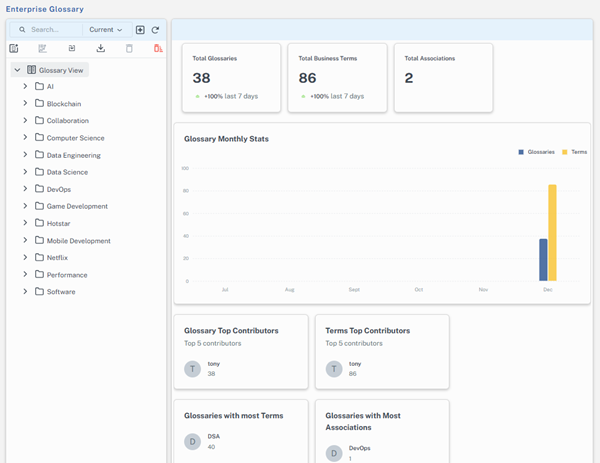
Following are metrics included:
-
Total Glossaries: Displays the total number of glossaries in the system
-
Total Business Terms: Displays the count of all business terms across glossaries
-
Total Associations: Displays the number of associations
-
Glossary Monthly Stats: Tracks monthly addition of glossaries and terms
-
Glossary Top Contributors: Lists the top 5 contributors who added or updated glossaries
-
Terms Top Contributors: Lists the top 5 contributors who added or updated the most terms
-
Glossaries with Most Terms: Displays glossaries that contain the highest number of terms
-
Glossaries with Most Associations: Displays glossaries with the most term associations